
Nol Card Balance Check Online in Dubai: RTA Methods Guide
Is Your Nol Card Balance Too Low to Enter the Metro?
Avoid delays at Dubai Metro gates by checking your Nol card balance before you travel.
Use this guide to learn where to find your Nol Tag ID, how to check your balance safely, what to do if your balance is low, and which Nol card is best for your travel needs.
You can check your Nol card balance through the official RTA website, Nol Pay app, metro station machines, and other supported methods. You may need the Nol Tag ID printed on your card when checking your balance online.
Use the official RTA website or Nol Pay app for the safest balance check.
Quick Answer: How to Check Your Nol Card Balance
You can check your Nol card balance through the official RTA website, Nol Pay app, metro station machines, and authorized retail outlets. For online balance checking, you may need the Nol Tag ID printed on your card.
|
Need |
Best Option |
|---|---|
|
Check Balance Online |
Official RTA website or Nol Pay app |
|
Check Balance at Station |
Metro ticket machine or customer service counter |
|
Find card number |
Nol Tag ID printed on your card |
|
Recharge before travel |
Nol Pay app, RTA website, vending machine, or retailer |
|
Fix pending recharge |
Tap/activate at a supported RTA machine or gate |
If your balance is low, recharge before starting your journey to avoid delays at Dubai Metro gates, bus entry points, or tram stations.
What Is a Nol Card Used For in Dubai?
A Nol card is a smart travel card used to pay for Dubai Metro, buses, tram, RTA parking, and selected partner services where Nol payment is accepted.
Whether you are a tourist or a daily commuter, checking your Nol balance before travel helps you avoid delays at Metro gates, bus entry points, and tram stations.
Dubai has different Nol card options for visitors, regular commuters, Gold Class users, and registered residents. If you are unsure which one suits your trip, use the selector below or read our full Nol card types guide.
Which Nol Card Should You Choose?
Not every Nol card is suitable for every traveler. Answer the quick questions below to understand which Nol card may fit your Dubai travel needs.
I am a tourist staying for 1–3 days
Best Option: Red Ticket
A Red Ticket can work for short visits or limited trips. It is useful if you only plan to use public transport a few times during your stay.
I will be often using Metro often
Best Option: Silver Nol Card
A Silver Nol Card is usually the better all-round option if you plan to use Dubai Metro, buses, or tram multiple times during your trip.
I want to use Gold Class cabins
Best option: Gold Nol Card
A Gold Nol Card is suitable if you want access to Gold Class cabins on Dubai Metro and tram. Fares are higher than standard class.
I live in Dubai or want balance protection
Best option: Blue Nol Card
A Blue Nol Card is a registered card option for residents and eligible users. It may be useful if you want personal registration and balance protection.
Minimum Nol Card Balance Before You Travel.
Before using Dubai Metro, bus, or tram, make sure your Nol card has enough balance for your trip. A commonly referenced minimum balance for starting a public transport journey is AED 7.50, but the amount you need can vary depending on your route, fare zone, card type, and travel class.
You can recharge or top up your Nol Card through the official RTA website, Nol Pay app, metro station ticket machines, customer service counters, and authorized retail outlets.
To use your card, tap it at the Metro gate, bus validator, or tram validator when required. The fare is deducted automatically based on your trip.
Note:
Minimum Balance and minimum top-up amount are not the same. Always check the official RTA website or Nol Pay app for the latest balance, fare, and recharge rules.
How to Check Nol Card Balance: Best Methods
| Method | Best for | My recommendation |
|---|---|---|
| Official RTA website | Checking online before travel | Best first option |
| Nol Pay app | Mobile users and NFC-supported phones | Best for regular users |
| Metro station machine | Travelers already at station | Best offline option |
| Authorized retailer/counter | Cash users or users needing help | Good support option |
| SMS | Registered users, if supported | Verify before using |
1. Check Nol Balance on the Official RTA Website
You can check your Nol card balance online or at public transport locations in Dubai. The safest options are the official RTA website, the Nol Pay app, metro station machines, and authorized service points.
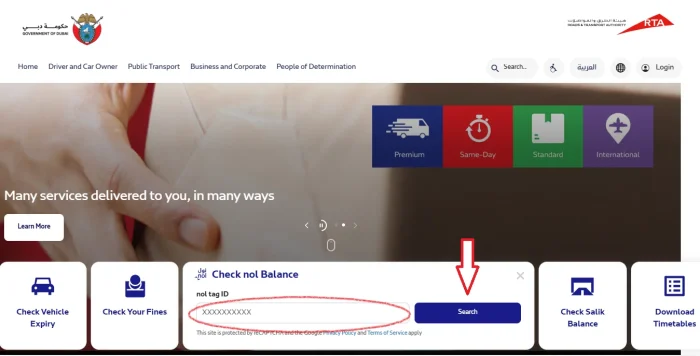
Use this method if you want to check your balance online before traveling.
Steps:
- Visit the official RTA balance-check page.
- Enter the Nol Tag ID printed on your card.
- Complete any verification shown on the official page.
- View your available balance, pending credit, or card details if shown.
2. Check Balance Using the Nol Pay App
The Nol Pay app is an official RTA app for managing Nol cards. It allows users to check card information, top up cards using NFC-supported phones, add travel passes, register anonymous cards, renew personal Nol cards, and report lost or damaged registered cards.
Use this method if you prefer checking and managing your Nol card from your phone.
Steps:
- Install the official Nol Pay app.
- Log in or follow the app instructions.
- Add or scan your Nol card if required.
- View your card details and available balance.
3. Check Nol Balance at Metro Station Machines
Use this method if you are already at a Dubai Metro station.
Steps:
- Go to a ticket vending machine or self-service machine.
- Tap or insert your Nol card as instructed.
- Choose the balance-check option if required.
- View your current balance on the screen.
This is useful before entering the Metro if you are not sure whether your card has enough balance.
4. Check Balance at Authorized Retailers or Service Counters
Some authorized Nol retailers, ticket offices, and customer service counters can help you check or recharge your card.
Use this method if:
- you want help from a staff member
- you are paying by cash
- your card is not working properly
- you want to recharge and check balance at the same time
5. SMS Balance Check, If Currently Supported
SMS balance-check services may be available for registered users, but instructions can change. If you want to use SMS, confirm the latest method through RTA before relying on it.
For most users, the official RTA website, Nol Pay app, or metro station machines are safer and easier options.
Pending Credit Note:
If you recharge your Nol card online and the balance does not appear immediately, the credit may still be pending. You may need to activate it by tapping your card at a supported RTA machine, metro gate, parking meter, or through the Nol Pay app where supported.
Can You Check Nol Card Balance History?
The Nol Pay app may also help users view recent card activity, top-ups, and travel transactions where supported. App menus and features can change, so follow the latest instructions shown inside the official Nol Pay app.
For most users, the main purpose is simple: check your current balance before traveling and recharge if the balance is low.
Types of Nol Cards in Dubai
Dubai’s RTA issues several types of Nol cards, each designed for different users—commuters, tourists, students, or premium travelers. Here’s a complete breakdown:
Silver Nol Card (Everyday Use)
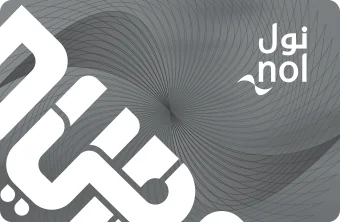
The Silver Nol Card is the most widely used metro and bus pass in Dubai, offering affordable fares across all transport modes and RTA services.
| Cost | AED 25 (includes AED 19 balance). |
| Maximum Balance | Up to AED 5,000 (registered) or AED 1,000 (unregistered). |
| Validity | 5 years. |
| Best For | Daily commuters using Metro, buses, trams, and parking. |
Gold Nol Card (VIP Access)

The Gold Nol Card gives access to the Gold Class cabin on Dubai Metro and Tram, with higher fares but premium seating and comfort.
| Cost | AED 25 (includes AED 19 balance). |
| Maximum Balance | AED 5,000 (registered). |
| Validity | 5 years. |
| Special Feature | Access to Gold Class Metro & Tram cabins (premium seating, double fare). |
| Best For | Travelers who prefer comfort and privacy. |
Red Ticket (Tourists & Short-Term Use)

The Red Nol Ticket is a paper-based metro pass for short stays or tourists, valid for up to 10 single trips across Dubai transport.
| Cost | AED 2. |
| Usage | Up to 5 daily passes or 10 single trips. |
| Validity | 10 trips or 90 days. |
| Best For | Tourists, short stays, and infrequent travel. |
Blue Nol Card (Personalized)
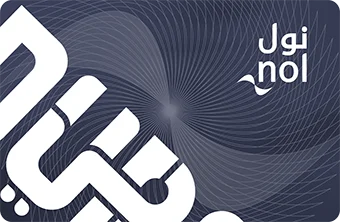
The Blue Nol Card (Personalized Card) links to your Emirates ID, offering balance protection, online recharge, and monthly pass options.
| Cost | AED 70 (includes AED 20 balance). |
| Maximum Balance | Maximum Balance AED 5000 |
| Validity | 5 years. |
| Special Feature | Linked to Emirates ID, refundable if lost or stolen, 50% discounts for students and senior citizens. |
| Best For | Residents and long-term users. |
“Not sure which Nol card suits your travel needs? From Silver and Gold to Blue and Red tickets, each card has its own benefits, fares, and features. Check out our complete guide to all Nol Card Types in Dubai to choose the best option for you.”
Dubai Metro Timings and Route Planning
Dubai Metro timings may change during weekends, public holidays, maintenance work, and special events. Before traveling, check the latest schedule through official RTA channels or use a Dubai journey planner.
For a full schedule, read our Dubai Metro Timings Guide.
Need Help With Your Nol Card?
If your Nol card is lost, damaged, not working, or showing an incorrect balance, contact RTA Dubai through official support channels.
Common reasons to contact RTA include:
- Lost or stolen Nol card.
- Failed or pending recharge.
- Card not working at Metro gates or bus validators.
- Refund or balance transfer questions.
- Registered Blue Nol Card issues.
| RTA Sources | Contact Info |
|---|---|
| 24/7 Call Centre agents | 800 90 90 |
| 24/7 Overseas callers | +971 4 605 1414 |
For the latest support options, always check the official RTA website.
Why Keep Your Nol Card Balance Updated?
A Nol card makes it easier to move around Dubai without buying separate tickets for every trip. You can use it for Dubai Metro, buses, tram, and other Nol-supported services.
Keeping enough balance helps you:
- Avoid delays at Metro gates.
- Board buses and trams more smoothly.
- Recharge before your trip starts.
- Track your travel spending through supported official channels.
- Choose the right card type for your travel needs.
Final Tip
Before using Dubai Metro, bus, or tram, check your Nol card balance through the official RTA website, Nol Pay app, metro station machines, or authorized service points. If your balance is low, recharge before starting your journey.
For official balance checking, always use RTA Dubai or the Nol Pay app.
About this Guide
Nolcardbalance.com is an independent informational guide created to help Dubai residents, tourists, and daily commuters understand Nol card balance checking, recharge options, minimum balance, and common card issues.
We regularly review public RTA information, Nol Pay app details, and Dubai transport updates to keep this guide practical and easy to follow. When official rules, timings, fares, or card services change, users should always confirm the latest information through RTA Dubai or the Nol Pay app.
Last reviewed: May 2026