
NOL Card Recharge & Top Up NOL Card in Dubai (2026 Guide)
If you travel around Dubai by metro, bus, tram, or even pay for parking and shopping, your NOL card is your daily companion. But nothing is worse than rushing to the station only to find out your card doesn’t have enough balance. The good news is that NOL card recharge (or topping up) has never been easier.
In this 2025 guide, we’ll show you all the ways to recharge your NOL card online and offline — from the official RTA website and mobile apps to ticket vending machines, solar-powered kiosks, and even merchant shops. You’ll also learn about minimum and maximum top up limits, instant balance activation, and common recharge issues (like pending credit).
Whether you’re a daily commuter or a visitor using Dubai’s world-class transport system, this article will help you pick the fastest and most convenient method to keep your card ready for travel.
Before recharging, it’s always a good idea to check how much balance you have left. You can read our full guide on how to check NOL card balance online to avoid surprises at the station.
How to Recharge NOL Card Online
Recharging your NOL card online is the easiest way to make sure you never run out of balance before your trip. The Roads and Transport Authority (RTA) offers multiple online top up options that work on both desktop and mobile.
1. Recharge via RTA Website
The official RTA website lets you add balance anytime with just your NOL card number and a debit/credit card.
Steps:
2. Recharge via NOL Pay App
The NOL Pay app is the official RTA mobile app that works on Android, iOS, Huawei, and Samsung devices.
Steps:
3. Recharge via S’hail App
The S’hail app also supports NOL card recharge along with route planning and ticketing.
Steps:
4. Recharge via Mehboub Chatbot
Dubai’s AI-powered assistant Mehboub Chatbot also helps with NOL services.
Steps:
This is a newer method and still being optimized by RTA.
How to Recharge NOL Card Offline
If you prefer handling cash or don’t have access to the internet, there are plenty of offline top up Nol Card options available across Dubai. These methods are quick, secure, and convenient for daily commuters.
1. Ticket Vending Machines (TVMs)
Located at every Dubai Metro station, bus station, and tram stop, Ticket Vending Machines let you recharge your NOL card instantly.
Steps:
2. Ticket Office Machines (TOMs)
If you need assistance, you can recharge at Ticket Office Machines manned by RTA staff.
Steps:
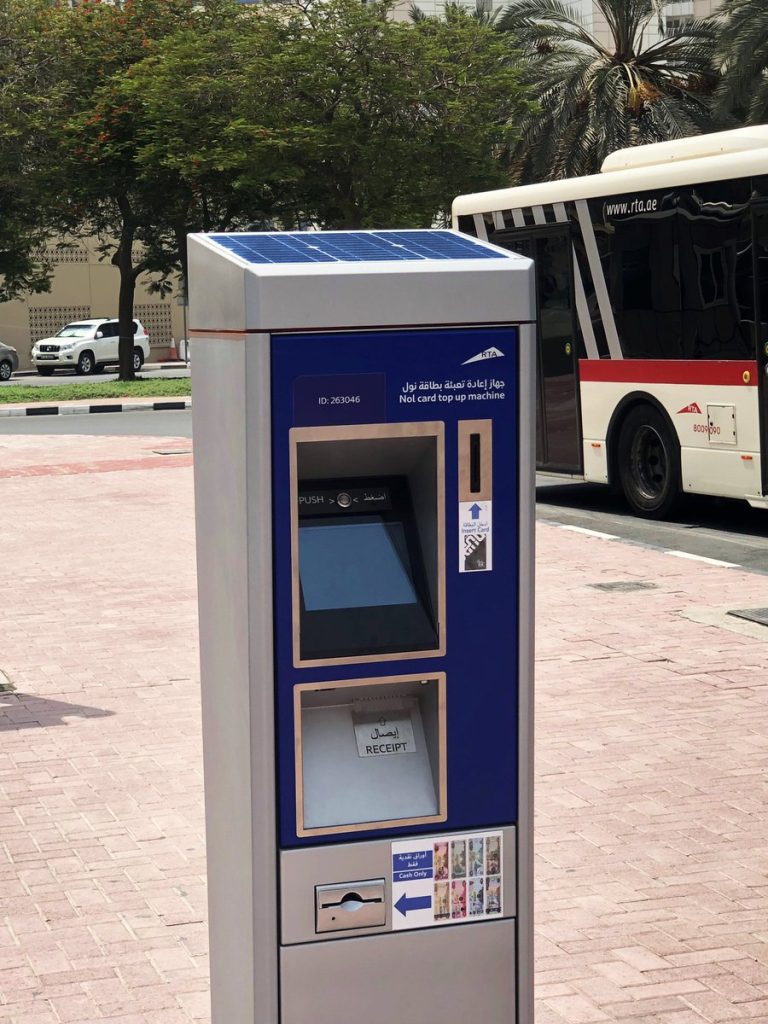
3. Solar-Powered Smart Kiosks
RTA has deployed solar-powered top up kiosks at bus stops and public places. These kiosks work similarly to vending machines.
Steps:
4. Merchant Shops & Authorized Retailers
Over 2,000 retail shops and supermarkets in Dubai allow you to recharge your NOL card.
Steps:
5. Banks & Partner Apps
Some Dubai banks (like Emirates NBD and ADCB) allow NOL recharge via their mobile apps or ATMs.
Steps:
Comparison Table (NOL Card Recharge Online vs Offline Methods)
Nol Card Recharge Methods at a Glance.
|
Recharge Method |
Type |
Payment Options |
Processing Time |
Best For |
|
RTA Website |
Online |
Debit/Credit Card |
Instant (pending credit must be activated at gate) |
Users who prefer desktop recharge |
|
NOL Pay App |
Online |
Debit/Credit Card, NFC Wallet |
Instant (tap at validator to activate) |
Mobile-friendly commuters |
|
S’hail App |
Online |
Debit/Credit Card |
Instant (requires tap activation) |
Route planners & app users |
|
Mehboub Chatbot |
Online |
Debit/Credit Card |
Few minutes (experimental) |
Tech-savvy users exploring AI chat recharge |
|
Ticket Vending Machines |
Offline |
Cash & Card (varies by machine) |
Instant |
Metro & bus station travelers |
|
Ticket Office Machines |
Offline |
Cash & Card |
Instant |
Those who prefer staff assistance |
|
Solar-Powered Smart Kiosks |
Offline |
Cash & Card |
Instant |
Bus stop users without app access |
|
Merchant Shops / Retailers |
Offline |
Cash & Card |
Instant |
Everyday shoppers at supermarkets & stores |
|
Bank Apps / ATMs |
Online + Offline |
Debit/Credit Card (via banks) |
Within minutes (activation required) |
Customers of participating banks |
Tip: No matter which method you choose, remember that pending credit must be activated by tapping your NOL card at a metro gate, bus validator, or parking meter.
Common Issues with NOL Card Recharge (and How to Fix Them)
Even though recharging your NOL card is usually smooth, sometimes you might face small issues. Here are the most common problems and their quick fixes:
1. Pending Credit Not Showing
- Issue: After recharging online, the balance doesn’t appear immediately on your card.
- Fix: Tap your card at any metro gate, bus validator, or parking meter to activate the pending amount. This is a required step for all online top ups.
2. Recharge Delay
- Issue: Sometimes nol card recharges via bank apps or chatbot may take longer than expected.
- Fix: Wait a few minutes and check again at an RTA validator. If it still doesn’t appear, call RTA Customer Service (800 9090) with your transaction reference.
3. Failed Transaction
- Issue: Payment deducted from your bank account, but no balance is added to your NOL card.
- Fix: Keep the payment receipt or SMS. Contact your bank first; if not resolved, report to RTA support with your card number and payment reference. Refunds usually take 3–7 working days.
4. Card Not Recognized at Machine
- Issue: Ticket vending machine or kiosk doesn’t read your card.
- Fix: Try another machine. If the issue continues, visit an RTA customer service center to check if your card is damaged or expired.
5. Expired or Damaged Card
- Issue: Recharge fails because the card is expired or physically damaged.
- Fix: Replace your card at an RTA service center. If it’s a Personalized (Blue) card, you may request a balance transfer to your new card.

